Mental Load
How to Organize Family Medical Appointments Without Manual Data Entry
Between paper printouts, patient portals, and reminder emails, family medical appointments arrive in a dozen different formats. Here's the system that finally worked for mine.
9 min read ·
The Physical Therapist Handed Me Twenty-Five Appointments
The physical therapist handed me another printout on the way out.
Twenty-five appointments. Twenty-five dates and times squeezed into an awkward little table across a couple pieces of paper that immediately got shoved into my bag. I already knew what was waiting for me when I got home: twenty minutes of manually typing everything into three different calendars.
Two weeks later the schedule changed. They printed another one.
Twenty-three appointments to update.
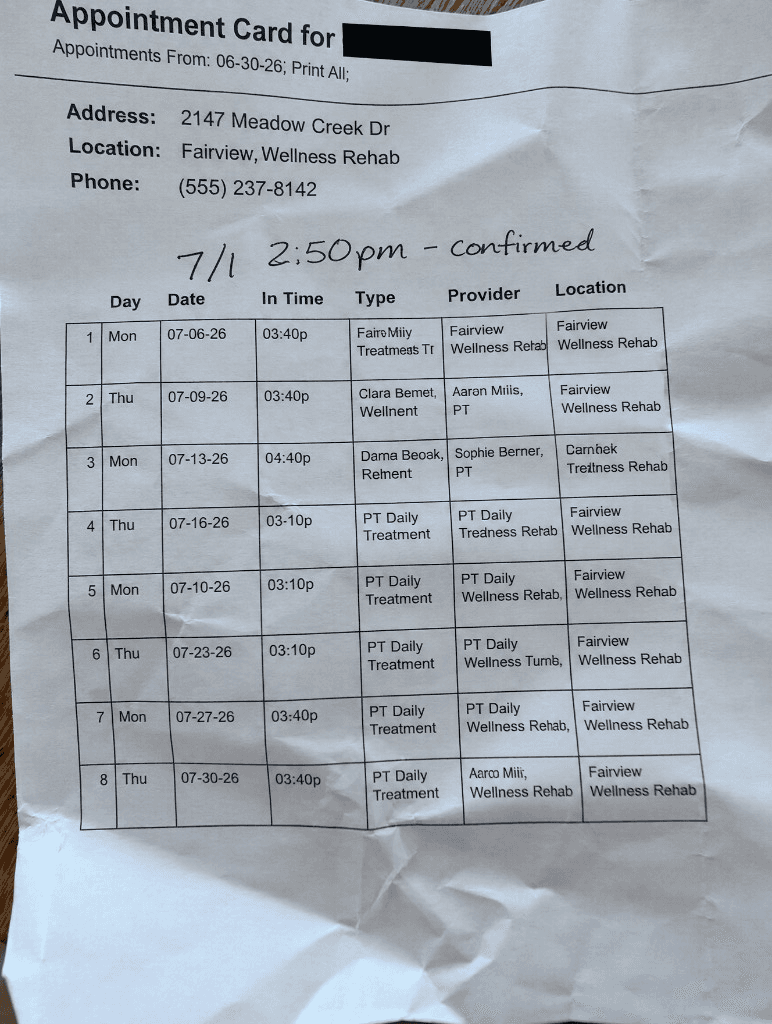
If you're the person in your family responsible for keeping everyone's medical appointments straight, you probably felt your shoulders tense just reading that.
Because appointments don't show up in one nice, consistent format that's ready for Google Calendar to import.
Some arrive as emails from the doctor's office. Some live inside patient portals with passwords you can never remember. Some are printouts. Some are scribbled on appointment cards. Some get rattled off as you're walking out the door.
I even got this weird business-card-sized thing after getting my MMR vaccine. The nurse had to explain that she'd written my next appointment on the back in pen.
Seriously?
Someone has to catch all of that. Someone has to read it, get it into the family calendar correctly, and remember to look at the calendar later.
Most of the time, that someone is one person in the family.
Why Family Medical Appointments Are So Hard to Keep Organized
We've been in a heavy season of medical appointments lately. Aside from the normal checkups (how is someone ALWAYS going to the dentist?), we've had broken bones, physical therapy, specialist visits, major surgeries, ER trips, and even the surprise of discovering that my immunity to measles had apparently disappeared somewhere along the way, so I found myself getting a few rounds of shots again at 41.
Maybe your family doesn't look exactly like mine.
Maybe it's braces. ADHD evaluations. Allergy shots. A toddler with ear infections. A parent seeing specialists.
The details are different, but the work is the same. Every appointment has to make it from wherever it arrives into a calendar you can actually trust.
For years my process looked like this.
Open Google Calendar.
Type the date.
Type the time.
Type the doctor's name.
Type the address.
Double-check AM versus PM.
Check it again.
Then check it one more time because if I accidentally show up four hours late to a specialist appointment that took three months to schedule, I might actually cry in the parking lot.
When I became a stepmom to four kids, I bought a Skylight Calendar thinking it would help. Instead, it mostly added another ten minutes of standing in the kitchen typing the exact same information into a different screen using an on-screen keyboard for another format nobody is going to look at.
That's when I realized something.
The calendar wasn't the problem.
Google Calendar is great at storing appointments. Skylight is great at displaying appointments. Neither one is very good at helping you get appointments there in the first place.
They both assume the information already exists in a clean, structured format.
Real life doesn't work that way.
The Appointment I Almost Got Wrong
A few weeks before my hysterectomy, the surgeon's office called. They'd had a cancellation and asked if I wanted to move my surgery earlier.
Absolutely.
We agreed on a new date over the phone. I immediately updated my calendar and then ignored every confirmation email they sent because the number of appointment reminders I was getting across the whole family was too much to keep up with.
A couple weeks later, the pre-op nurse called to go over instructions. She kept saying, "this Friday."
Finally I interrupted her.
"You keep saying Friday, but I think my surgery is next Tuesday."
She very kindly corrected me.
It was Friday.
Which meant I had to sheepishly tell everyone from my boss to my partner that I had somehow gotten the date of my own surgery wrong. Me, the person who always has everything in her head and under control, couldn't even remember the date of the biggest medical procedure of her life.
How embarrassing.
And how lucky was I that my partner was able to rearrange his time off work with almost no notice so he could take care of me. If he couldn't, that story ends very differently.
That was one appointment.
For one adult.
Now multiply that by orthodontics, pediatricians, physical therapy, specialists, dentists, follow-up appointments, and whatever surprise life decides to throw at your family next.
The data entry alone becomes a part-time job. It's also a part-time job where mistakes actually matter.
The Real Problem Isn't Your Calendar
That experience finally made something click for me.
The problem wasn't Google Calendar. The problem wasn't Skylight. The problem was everything that happens before the calendar.
Appointments don't arrive as calendar events. They arrive as paper printouts, emails, patient portals, text messages, appointment cards, and quick conversations while you're halfway out the door.
We spend all of our time translating information instead of actually using it.
That's the part I wanted to eliminate.
That's why I built Smitty.
Not because I wanted another calendar, but because I wanted something that could understand appointments the way they actually arrive.
I didn't need a better place to store appointments. I needed a better way to get them there.
That's the product I couldn't find, so I built Smitty.
How I Add Medical Appointments to My Calendar Now
Here's what my workflow looks like now.
The PT hands me twenty-five appointments. I snap a photo before I even leave the parking lot.
Done.
The dentist emails a confirmation. I forward it.
Done.
A specialist sends an appointment reminder inside a patient portal that won't export to anything. I take a screenshot and text it to Smitty.
Done.
The orthodontist hands me an appointment card.
Photo. Done.
I don't type the date. I don't type the time. I don't check AM versus PM seventeen times.
The appointment is already on my calendar. If I need the address later, it's there. If I need the phone number, it's there.
The stack of crumpled printouts in the bottom of my purse doesn't matter anymore because the important information escaped before the paper disappeared.
I built Smitty because I was tired of spending my evenings doing data entry. I wanted to spend ten seconds capturing an appointment instead of ten minutes typing it into multiple calendars and hoping I hadn't made a mistake.
That's really it.
No new calendar to learn. No complicated workflow.
Just snap a photo, forward an email, or send a screenshot and let Smitty do the part nobody enjoys.
If You're the One Retyping Everything
If you're the person quietly acting as your family's human router, I see you.
You're reading every printout, screenshotting every patient portal, forwarding every reminder, and retyping every appointment so everyone else knows where they're supposed to be.
Most people never notice that work until something gets missed.
You don't have to spend your evenings doing data entry anymore.
Snap the photo.
Forward the email.
Screenshot the portal.
Let something else do the typing.
You already have enough things to check seventeen times.
Stop retyping appointments.
Snap a photo, forward an email, or send a screenshot. Smitty gets the appointment onto your calendar so you don't have to type it yourself.
Frequently Asked Questions
Can I automatically add medical appointments to Google Calendar?
Yes. Smitty can read appointments from photos, screenshots, emails, and other formats, then add them to your calendar without manually typing every detail.
What if my doctor's office gives me a paper printout?
Take a photo of it. Smitty reads the dates, times, and appointment details and adds them to your calendar.
Can Smitty read patient portal screenshots?
Yes. If an appointment is trapped inside a patient portal, just take a screenshot and send it to Smitty.
Why not just use Google Calendar?
Google Calendar is a great place to store appointments. The hard part is getting appointments there in the first place. Smitty handles that step.