Family Operations
How to Forward School Emails to a Shared Family Calendar (So You're Not the Only One Who Knows)
Tired of being the family's human inbox? Here's how forwarding school emails to a shared calendar works, why it beats manual entry, and how to set it up in minutes.
8 min read ·
The Sunday Night Inbox Scroll Is Not a Personality Flaw
It's 9:40 p.m. Lunches are made, backpacks are more or less packed, and you're finally sitting down — which means it's time to scroll back through a week of school emails to make sure nothing got missed. The PTA newsletter. The field trip form. The "reminder: early dismissal Thursday" email that somehow arrived the same week as four other early dismissal reminders that were not about Thursday.
You are not imagining the volume. According to a Yahoo Mail survey, the average parent receives around four emails a day related to their children, their school, and extracurricular activities — about 20 a week, or over 80 a month. Fifty-six percent said they receive too many emails, and 62% admitted missing an important event or detail buried in their inbox. Over half (52%) feel overwhelmed by their personal email, 49% said it adds to their mental load as a parent, and 37% said email interferes with quality family time.
The part that stings most: 71% of parents said they feel like bad parents when they miss important information about their kids. That's not a time-management problem. That's a system problem — one email inbox was never designed to be the family's shared source of truth.
The fix a lot of parents are quietly adopting isn't a better filing habit. It's taking the reading out of the loop entirely: forward the email, let something else find the dates, and let those dates show up somewhere the whole household can see.
What "Forwarding to a Calendar" Actually Means
The basic idea is simple, and you've probably seen versions of it: you get (or set up) a private forwarding address, you send a school email to it instead of reading it top to bottom, and a piece of software reads the message for you — pulling out dates, deadlines, and anything that needs an action — and puts that information somewhere shared.
The "somewhere shared" part matters more than it sounds. A calendar only helps if the person who needs the information actually looks at it before the moment has passed. That's why the better version of this idea doesn't stop at "event added to calendar." It also tells a human, at the moment they need to know, in a place they're already looking. For most parents, that place is a text message, not a calendar app they have to remember to open.
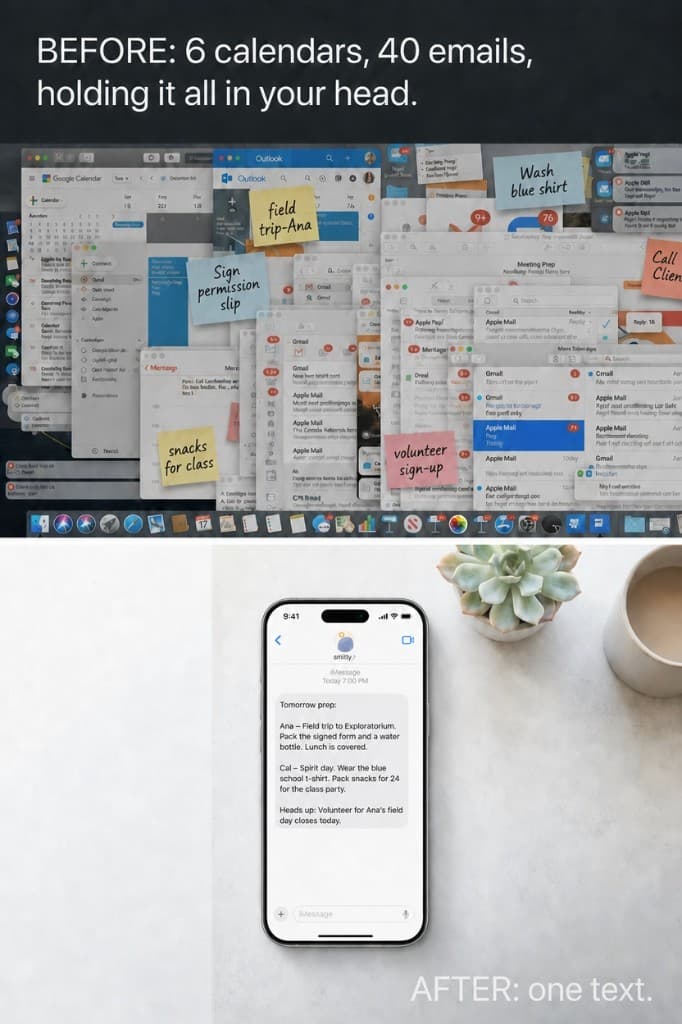
That's the exact gap Smitty is built to close: you forward the email, Smitty pulls out the dates, deadlines, and action items, and it sends a calm morning text with what actually matters — while quietly keeping a shared calendar running in the background for your partner, a nanny, or anyone else who needs the bigger picture. See how Smitty handles a real week for the full walkthrough.
The 5-Minute Setup That Gets Both Parents Out of the Inbox
You don't need to reorganize your entire digital life to make this work. The setup is closer to adding a contact than installing new software:
- Get your private forwarding address. This is the address you'll send school emails to instead of (or in addition to) reading them yourself.
- Save it as a contact — something like "School Forward" — so autocomplete does the work when you hit forward.
- Make sure both parents (and anyone else who needs visibility) are set up, either by both forwarding to the same address or by joining the same shared household.
- Forward the moment you see it. The habit that actually sticks isn't "I'll deal with this later" — it's forward-then-archive. You're not filing the email for reference anymore; you're handing off the parsing work.
- Confirm it landed. The first few times, check that the event or reminder showed up correctly. After that, it becomes background trust rather than a step you think about.
If you have kids at more than one school, or a mix of school, sports, and activity emails, this is where the habit pays off the most — because the volume that used to require its own triage system now gets sorted automatically, by sender and by child.
Why a Calendar Alone Doesn't Fix It
Here's the part that's easy to miss: adding an event to a calendar does not, by itself, solve the missed-deadline problem. Plenty of families already have a shared Google Calendar and still lose track of the field trip form. The calendar isn't broken — it's just passive. Nobody opens a calendar app to double-check "did anything change today?" They open it when they already suspect something is there.
This is why the households actually feeling relief from this system aren't the ones who added a calendar — they're the ones who paired the calendar with a nudge that finds them. A text the morning of, not a color-coded square you have to go looking for. Research backs up why text is the format that actually cuts through: an analysis of 3.3 million school text messages found that 73% of texts got a parent response within just 11 minutes — a response speed that email simply can't match for time-sensitive information.
That's the design principle behind Smitty's morning text: three to five bullets, one per thing that actually needs you today, sent to your phone instead of waiting in an app. The calendar still exists and still updates in the background — so your partner or a nanny can check it if they want the fuller picture — but you're not required to open anything to know what matters.
What Good Extraction Actually Looks Like
Not every "email to calendar" tool handles a real school newsletter well. The easy cases — a flight confirmation, a dentist appointment — have clean, structured data. School emails are messier: a 400-word PTA newsletter with a field trip date in paragraph two, a consent deadline in paragraph four, and a fundraiser cutoff mentioned almost as an afterthought at the bottom. A good system needs to catch all three, not just the first date it finds.
Good extraction means:
- Every date gets pulled out, not just the first or most obvious one.
- Deadlines are flagged as actions, not just calendar entries — a permission slip due Friday is different from an event happening Friday.
- It's tied to the right kid, especially if you have more than one child or more than one school in the mix.
- You get told what happened, so you're not left wondering whether the email actually got read correctly. If something's ambiguous, it should ask you rather than guess.
This is also where a "just forward it" approach quietly earns its keep on the messy stuff most tools skip: a flyer photo from a backpack, a screenshot of a group text, a PDF permission slip. If your only path in is a clean forwarded email, you'll still be manually handling everything that doesn't arrive that way.
Privacy: What to Ask Before You Forward Anything
Handing over school emails means handing over real information about your kids — names, schools, schedules. Before you forward a single email to any service, it's worth asking a few questions:
- Is my data encrypted, both in transit and at rest?
- Does the company train AI models on my family's messages?
- Can I delete everything, easily, if I stop using it?
- Does anyone else get to see raw emails, or only the extracted, relevant details?
This is the criteria we think should be table stakes for any tool that touches your family's inbox — not a nice-to-have. You can read exactly what Smitty commits to on the security page, including zero-retention AI processing and a two-step DELETE command that wipes your data on request.
A Calmer Tuesday Morning
Picture the version of Tuesday where this is already working. The night before, the third-grade teacher sends a newsletter: half-day Wednesday, a reminder that book fair money is due Friday, and a mention that picture day got moved up a week. You forward it without reading past the subject line.
At 6 a.m., instead of an unread newsletter waiting in your inbox, you get a text: Half day tomorrow (dismissal 12:15). Book fair money due Fri — $8 suggested. Picture day moved to next Tues, not the following week. Your partner gets the same text. The nanny, who's picking up Wednesday, sees the early dismissal on the shared calendar without you having to remember to tell her separately.
Nobody read the newsletter. Everybody knows what's happening. That's the whole point — not a better inbox, a quieter one.
Sources
Stop being the only one who reads the school newsletter.
Forward the email. Get a calm morning text with what actually matters — while a shared calendar stays in the background for everyone else.
Frequently Asked Questions
Does this work with Gmail, Outlook, and school portals?
Forwarding works from any email client — Gmail, Outlook, Apple Mail, or a school communication app that lets you forward or export a message. If the school only allows in-app messages with no forwarding option, a photo or screenshot of the message works as a substitute input.
What if I have kids at two different schools?
This is one of the strongest cases for the habit. Instead of juggling two inboxes (or two apps) with different sending schedules, everything routes to one place and gets tagged by child, so you can tell at a glance what's Emma's and what's Jack's.
Will my partner see the same thing I do?
That's the point of pairing extraction with a shared calendar — both parents (and a nanny or grandparent, if you add them) see the same dates without one person having to relay everything verbally.
What about non-date information, like teacher requests or general updates?
Good systems separate "this needs a date on a calendar" from "this needs your attention but isn't a scheduled event" — flagging both, rather than only catching the obvious calendar items.
Is this just for school emails?
No — the same forwarding habit works for sports team emails, dance studio updates, and any other recurring source of dates and deadlines that currently live in your inbox.